


| TL;DR Buyer messages carry a 24-hour acknowledgement clock that affects your response-rate metric.Check Performance and Account Health at least once a week. It is the only dashboard that can end the account.The ten settings fall into three groups: account and legal, finance and tax, operations. Do them in that order.The tax interview needs a W-9 for US sellers, and it gates disbursement, not listing. Short version: the dashboard is designed to show you sales. The settings that decide whether you keep the account are somewhere else, and none of them are urgent until they are. |
A new Seller Central account opens on a screen built to show performance you do not yet have. Empty charts, a sales figure of zero, and a navigation bar with more entries than any single person needs.
The temptation is to start listing. The better use of the first hour is ten settings, most of which are invisible from the home screen and all of which are cheaper to configure now than to fix after they have caused something.
The full walkthrough of the Amazon Seller Central dashboard groups them into three categories, which is the right structure because the groups have different failure modes.
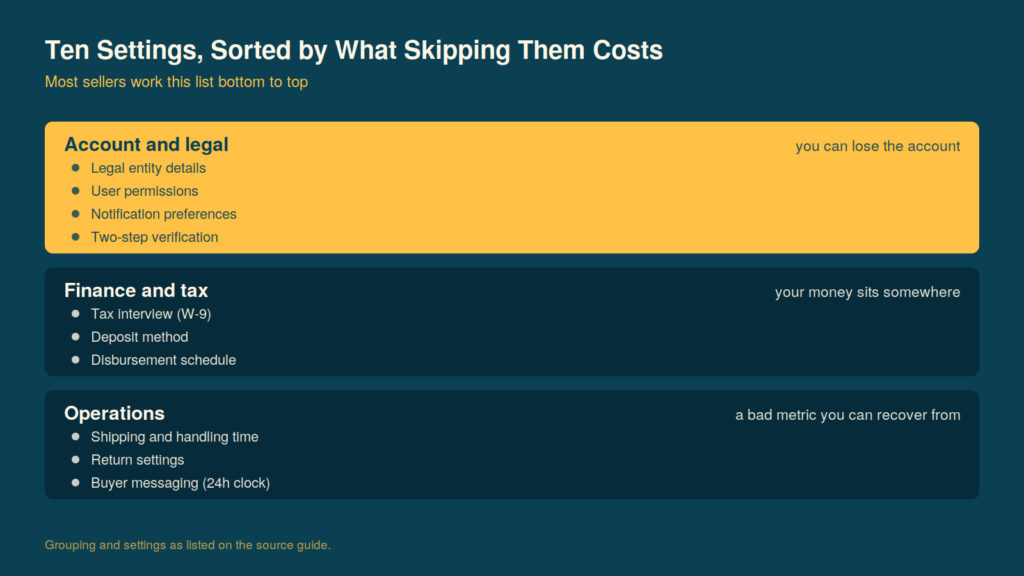
Sorted by what skipping them costs. The interface prompts you in roughly the opposite order.
Group One: Account and Legal
These decide whether the account survives.
Legal entity and business information. Must match your registration documents exactly. This is the same string that verification checked, and it can drift if anyone edits it later.
User permissions. If more than one person needs access, give each of them their own login. This is the single most-skipped setting on the list and the one the Federal Trade Commission is most direct about. Its Start with Security guide, built from more than eighty enforcement actions, advises restricting access based on need and using separate user accounts to limit who can reach sensitive data. A shared login defeats every audit trail the platform offers and turns one person’s compromised laptop into everyone’s problem.
Notification preferences. Decide now which alerts reach a human. The default configuration sends a great deal, which trains you to ignore all of it, which is worse than receiving none.
Two-step verification. On an authenticator app, with a backup method registered, before you have money in the account rather than after.
Group Two: Finance and Tax
These decide whether you get paid.
The tax interview. US sellers complete this with a Form W-9. The IRS’s page on Form W-9 describes its function plainly: it provides your correct Taxpayer Identification Number to the party required to file an information return reporting income paid to you. Amazon is that party. Getting the TIN wrong here produces a mismatch that surfaces months later, usually at a moment when you would rather be doing something else.
Deposit method. The receiving account must be in the name of the account holder. A personal account attached to a business-registered seller account is one of the most common disbursement rejections there is.
Disbursement schedule and currency. Worth setting deliberately if you are selling across marketplaces, because the default conversion arrangement is rarely the cheapest one available.
Group Three: Operations
These decide whether the account performs.
Shipping settings and handling time. The handling time you set becomes a promise. Setting it optimistically to look competitive is a decision to breach it later, and late shipment rate is a metric with teeth.
Return settings. Configure the address and the policy before the first return arrives, not during it.
Buyer messaging. This is the one with a clock on it. Acknowledge buyer messages within 24 hours to maintain a healthy response rate. The clock runs on weekends.
The Two Habits Worth Building Immediately
Settings are one-off. Two recurring checks matter more over a year than any of them.
Account Health, weekly. Check the Performance and Account Health dashboard at least once a week. It is the only screen in Seller Central capable of ending the business, and its warnings arrive well before its penalties do. A weekly glance is enough to catch almost anything while it is still cheap.
Business Reports, weekly. Pull the previous week’s figures rather than looking at the rolling dashboard. A week is short enough to act on and long enough to be signal rather than noise, and the discipline of pulling a fixed window stops you reading daily variance as a trend.
Why the Order Matters
The three groups are sequenced by what happens if you skip them.
Skip an operations setting and you get a bad metric you can recover from. Skip a finance setting and your money sits somewhere until you notice. Skip an account or legal setting and you can lose the account outright.
Most new sellers work the list in the opposite order, because operations settings are the ones the interface prompts you about while you are trying to publish a listing. The prompts are following the listing flow, not your risk exposure.
Ten Settings, One Sitting
Block an hour before you list anything. Work the three groups in order. Set a weekly reminder for Account Health and one for Business Reports.
Nothing on the list is difficult and nothing takes long. The reason it goes undone is that none of it is urgent on day one, and every item on it becomes urgent on exactly the day you cannot afford the interruption.


